



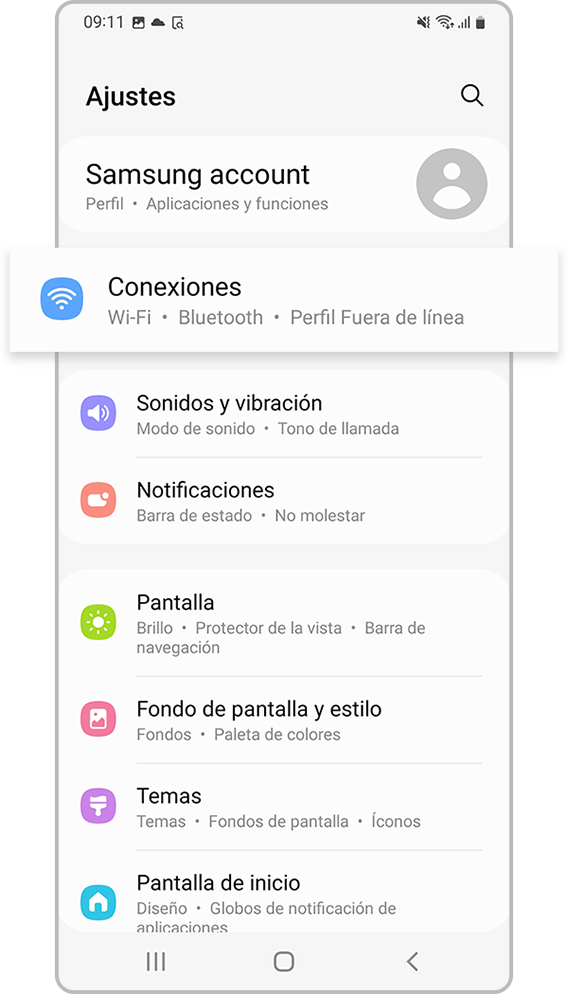
Launch the Settings application and select Connections.
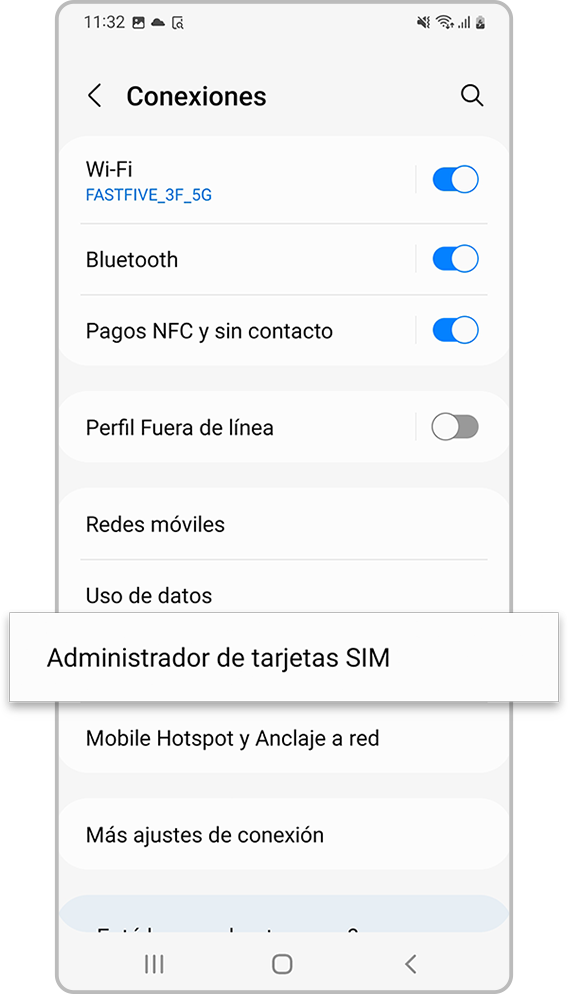
Select SIM Card Manager.
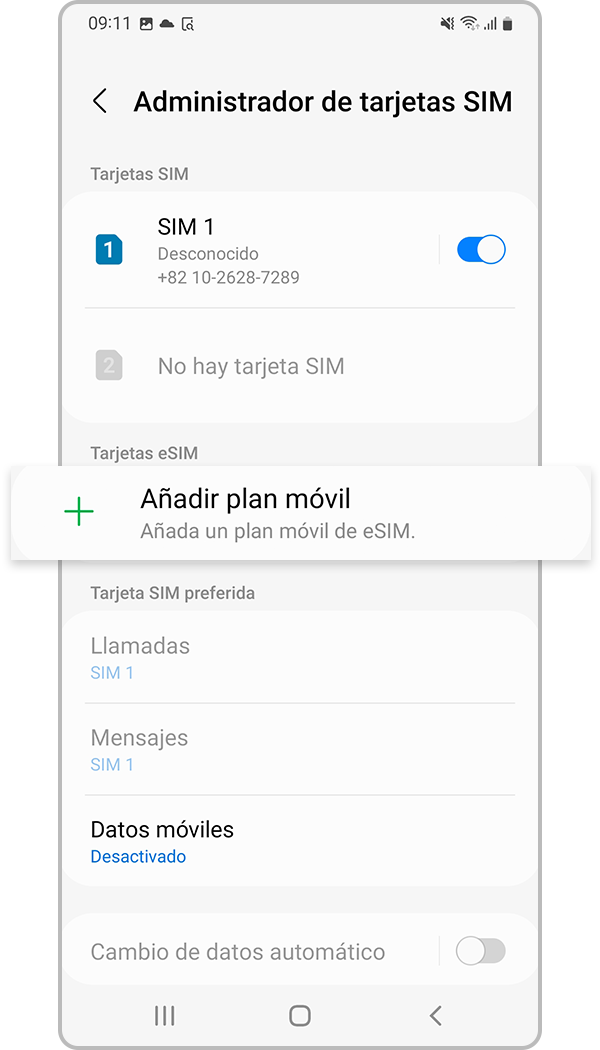
Step 3. Select Add Mobile Plan.
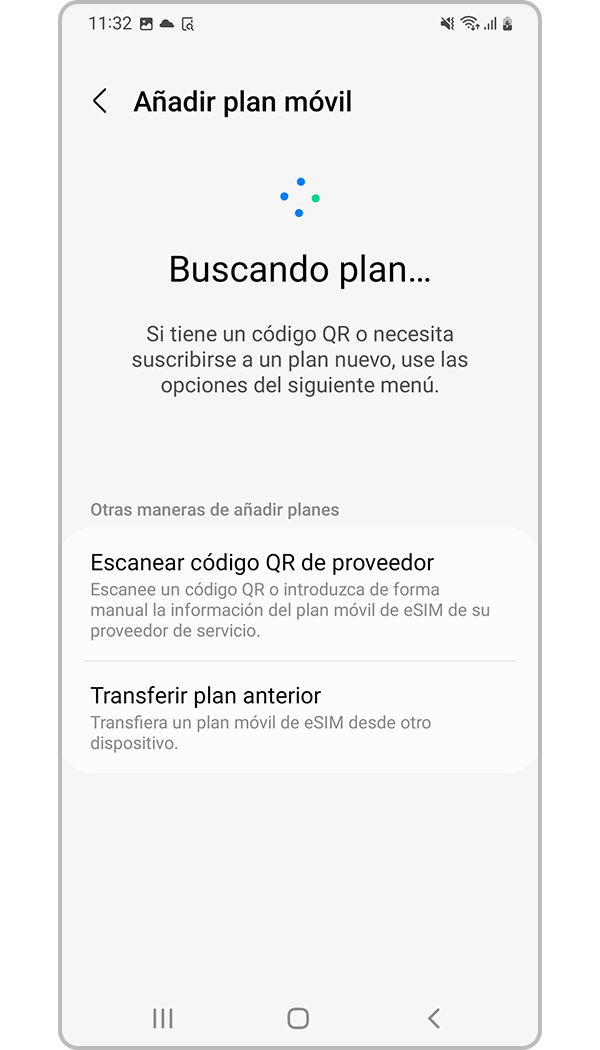
Step 4. When a mobile data service is detected, follow the on-screen instructions to activate the eSIM.
Tu plan de datos ilimitados ahora incluye seguro de viaje GRATIS ✈️
Tu plan de datos ilimitados ahora incluye seguro de viaje GRATIS ✈️
The eSIM is an electronic SIM card with which you can activate the cellular data plan provided by your carrier without the need to use a physical nano-SIM card. Learn how to set up an eSIM, how to transfer your SIM, what to do if you can’t set one up, and how to delete an eSIM if you ever need to.
If your Samsung series phone that includes an eSIM that works as a SIM card. You can use the mobile network after activating the eSIM or install a nano SIM card. To activate an eSIM, follow the steps below:
Launch the Settings application and select Connections.
Select SIM Card Manager.
Step 3. Select Add Mobile Plan.
Step 4. When a mobile data service is detected, follow the on-screen instructions to activate the eSIM.
| Cookie | Duración | Descripción |
|---|---|---|
| cookielawinfo-checkbox-analytics | 11 months | This cookie is set by GDPR Cookie Consent plugin. The cookie is used to store the user consent for the cookies in the category "Analytics". |
| cookielawinfo-checkbox-functional | 11 months | The cookie is set by GDPR cookie consent to record the user consent for the cookies in the category "Functional". |
| cookielawinfo-checkbox-necessary | 11 months | This cookie is set by GDPR Cookie Consent plugin. The cookies is used to store the user consent for the cookies in the category "Necessary". |
| cookielawinfo-checkbox-others | 11 months | This cookie is set by GDPR Cookie Consent plugin. The cookie is used to store the user consent for the cookies in the category "Other. |
| cookielawinfo-checkbox-performance | 11 months | This cookie is set by GDPR Cookie Consent plugin. The cookie is used to store the user consent for the cookies in the category "Performance". |
| viewed_cookie_policy | 11 months | The cookie is set by the GDPR Cookie Consent plugin and is used to store whether or not user has consented to the use of cookies. It does not store any personal data. |
| Cookie | Duración | Descripción |
|---|---|---|
| cookielawinfo-checkbox-analytics | 11 months | This cookie is set by GDPR Cookie Consent plugin. The cookie is used to store the user consent for the cookies in the category "Analytics". |
| cookielawinfo-checkbox-functional | 11 months | The cookie is set by GDPR cookie consent to record the user consent for the cookies in the category "Functional". |
| cookielawinfo-checkbox-necessary | 11 months | This cookie is set by GDPR Cookie Consent plugin. The cookies is used to store the user consent for the cookies in the category "Necessary". |
| cookielawinfo-checkbox-others | 11 months | This cookie is set by GDPR Cookie Consent plugin. The cookie is used to store the user consent for the cookies in the category "Other. |
| cookielawinfo-checkbox-performance | 11 months | This cookie is set by GDPR Cookie Consent plugin. The cookie is used to store the user consent for the cookies in the category "Performance". |
| viewed_cookie_policy | 11 months | The cookie is set by the GDPR Cookie Consent plugin and is used to store whether or not user has consented to the use of cookies. It does not store any personal data. |

Con SimLimites + Aeroambulancia, en caso de una emergencia médica estás cubierto. Garantizamos un rápido tiempo de respuesta, donde serás atendido y estabilizado por médicos emergenciólogos y luego trasladado a bordo de un helicóptero ambulancia al Centro de Salud de tu preferencia, dentro de la República Dominicana.

Médicos y emergenciólogos y enfermeros

Call center 24 horas.

Helicóptero configurado ambulancia

Ambulancias terrestres como soporte de la misión aérea.

Certificados con los estándares más altos de seguridad operacional y calidad

Equipos con tecnología altamente avanzada.

Transporte médico pediátrico.

Operaciones nocturnas.
¿Por qué requerimos el IMEI?
Verificamos el IMEI (International Mobile Equipment Identity) para comprobar que tu teléfono no esté en una lista negra internacional. El IMEI es un número único que identifica los dispositivos móviles en todo el mundo. Si el IMEI está bloqueado, tu dispositivo no podrá conectarse a redes de proveedores de servicios móviles en cualquier lugar, lo que limitará su funcionalidad y acceso.
Desbloqueo para todos los operadores:
La confirmación de si tu celular está desbloqueado para todos los operadores es importante para asegurar su correcto funcionamiento. Esta información se encuentra en la configuración del dispositivo y debe ser verificada por el usuario. Si compraste el celular a alguien que no es el fabricante, es crucial confirmar esta información, ya que podría estar bloqueado para algunos operadores, lo cual afectaría su utilidad y compatibilidad con diferentes redes móviles.
Confirmo que el/los dispositivos son compatibles con eSIM, están desbloqueados y no están en listas negras internacionales para que el servicio adquirido funcione en mi dispositivo. SimLimites no será responsable en caso de que el servicio adquirido no funcione debido a situaciones particulares de mi dispositivo móvil o en caso de que se encuentre bloqueado o pertenezca a una lista negra.
*Los siguientes dispositivos Apple NO disponen de eSIM:
Dispositivos iPhone de China continental.
Dispositivos iPhone de Hong Kong y Macao (excepto iPhone 13 Mini, iPhone 12 Mini, iPhone SE 2020 y iPhone XS).
*Los siguientes dispositivos Google Pixel NO tienen capacidad eSIM:
Los modelos Pixel 3 procedentes de Australia, Taiwán y Japón, y los adquiridos con servicio de operadores estadounidenses o canadienses distintos de Sprint y Google Fi.
Modelos Pixel 3a adquiridos en el sudeste asiático y con servicio de Verizon.
*La disponibilidad de la eSIM del Galaxy A54 5G puede variar según el país/región y el operador. Póngase en contacto con su operador o fabricante del dispositivo para confirmar que su dispositivo Galaxy A54 5G es compatible con eSIM.
*Los siguientes dispositivos Samsung Galaxy NO son compatibles con eSIM:
Todos los dispositivos Galaxy procedentes de China, Hong Kong y Taiwán.
Todos los modelos Galaxy FE «Fan Edition».
Modelos para EE.UU. del Galaxy S20, S21* y Note 20 Ultra.
*Los dispositivos de la serie Galaxy S21 (a excepción de los modelos FE) procedentes de Canadá y EE.UU. pueden tener capacidad eSIM siempre y cuando tengan instalada la actualización One UI 4. Por favor, póngase en contacto con su operador o fabricante del dispositivo para confirmar que su dispositivo Samsung es compatible con eSIM.
*La compatibilidad con eSIM dependerá de los operadores. Regiones que no admiten tarjetas SIM duales son: Australia (Telstra y Optus), Japón (KDDI)
Las funciones disponibles en la red en vivo dependen de las situaciones de la red del operador y la implementación de servicios relacionados.
Un dispositivo desbloqueado de fábrica es un móvil que puede aceptar cualquier proveedor de servicios telefónicos que usen redes similares.
¿Cómo verificas si tu dispositivo móvil está desbloqueado?
*Los siguientes dispositivos Apple NO disponen de eSIM:
Dispositivos iPhone de China continental.
Dispositivos iPhone de Hong Kong y Macao (excepto iPhone 13 Mini, iPhone 12 Mini, iPhone SE 2020 y iPhone XS).
*Los siguientes dispositivos Google Pixel NO tienen capacidad eSIM:
Los modelos Pixel 3 procedentes de Australia, Taiwán y Japón, y los adquiridos con servicio de operadores estadounidenses o canadienses distintos de Sprint y Google Fi.
Modelos Pixel 3a adquiridos en el sudeste asiático y con servicio de Verizon.
*La disponibilidad de la eSIM del Galaxy A54 5G puede variar según el país/región y el operador. Póngase en contacto con su operador o fabricante del dispositivo para confirmar que su dispositivo Galaxy A54 5G es compatible con eSIM.
*Los siguientes dispositivos Samsung Galaxy NO son compatibles con eSIM:
Todos los dispositivos Galaxy procedentes de China, Hong Kong y Taiwán.
Todos los modelos Galaxy FE «Fan Edition».
Modelos para EE.UU. del Galaxy S20, S21* y Note 20 Ultra.
*Los dispositivos de la serie Galaxy S21 (a excepción de los modelos FE) procedentes de Canadá y EE.UU. pueden tener capacidad eSIM siempre y cuando tengan instalada la actualización One UI 4. Por favor, póngase en contacto con su operador o fabricante del dispositivo para confirmar que su dispositivo Samsung es compatible con eSIM.
*La compatibilidad con eSIM dependerá de los operadores. Regiones que no admiten tarjetas SIM duales son: Australia (Telstra y Optus), Japón (KDDI)
Las funciones disponibles en la red en vivo dependen de las situaciones de la red del operador y la implementación de servicios relacionados.